Seedance 2.0
Flagship · Video团队主力 · 视频The all-round flagship video model: native 4K·10-bit cinematic quality, built-in synced audio and lip-synced dialogue, and the strongest multi-asset reference compositing. One prompt can produce a full multi-shot ad with complete camera work. 全能旗舰视频模型:原生 4K·10-bit 电影级画质、自带同步音效与对嘴台词、最强的多素材参考合成。一句 prompt 就能产出带完整运镜的多镜头广告。
Cinematic commercial texture: 4K · 10-bit material rendering电影级商业质感:4K · 10-bit 材质渲染
Text-to-video文字生视频Hair strands, metallic reflections, fabric texture — the kind of shots that live or die on texture — are Seedance's 4K tier at its best. 10-bit color depth means large gradients like sunsets, lipstick, or liquor don't band into visible rings (a common failure point for 8-bit models). All four clips above are official raw output, with no post-processing. 头发丝、金属反光、织物纹理这类「烧质感」的画面是 Seedance 4K 档的主场。10-bit 色深让夕阳、口红、酒液这种大面积渐层不会出现一圈圈色带(8-bit 模型常见翻车点)。以上四支全部是官方直出素材,没有后期。
- Choose Seedance 2.0, set mode to Text-to-video, and set resolution to 4K (or 1080p to save cost)
- Spell out material + lighting + camera move in the prompt, one shot per sentence
- 模型选 Seedance 2.0,模式「文字生视频」,分辨率拉到 4K(或 1080p 省成本)
- prompt 里明确「材质 + 打光 + 运镜」,一句一个镜头
One prompt = one complete storyboarded ad一句 prompt = 一支完整分镜广告
Text-to-video文字生视频Seedance's most underrated ability: it automatically cuts between multiple shots within a single generation, keeping the product, lighting, and color grade consistent across shots. The 15-second beer ad on the left is a single, one-shot generation — bottle-opening close-up → slow-motion pour → toast wide shot — no need to generate separately and edit together. Seedance 最被低估的能力:单次生成里自动切多个镜头,而且产品、光线、色调跨镜头保持一致。左边这支 15 秒啤酒广告是一次生成直出——开瓶特写→倒酒慢镜→举杯全景,不需要分开生成再剪辑。
- Write the prompt in "Shot 1 → Shot 2 → Shot 3" order, one sentence per shot
- Give it enough duration (12–15 seconds) so each shot has 4–5 seconds of room
- 按「镜头 1 → 镜头 2 → 镜头 3」的顺序写 prompt,每个镜头一句
- 时长给足(12–15 秒),让每个镜头有 4–5 秒空间
Multi-person dialogue with synced lips across a complete scene多人对白:完整场景里持续同步嘴型与角色
Official 2.0 · 4K2.0 正式版 · 4KThis is the official Seedance 2.0 release example at 3840×2160: a Spring Festival family scene with several people speaking together. It demonstrates more than a talking head — voices, mouth movement, character identity and the festive environment remain coherent while the shot develops. Put exact spoken words in quotation marks and describe who speaks, when, and with what emotion. 这是 Seedance 2.0 正式发布案例,原片 3840×2160:春节家庭场景里多人一起说话。重点不只是一张脸对嘴,而是镜头推进时,人声、嘴型、角色身份和节庆环境都保持一致。把准确台词放进双引号,并写清楚谁在何时、用什么语气说。
- Choose Seedance 2.0, enable Audio, and describe the people plus the scene before the dialogue
- Put exact lines in "double quotes"; explicitly state whether one person or the group is speaking
- 选择 Seedance 2.0 并打开 Audio,先交代人物与场景,再写对白
- 准确台词用 「双引号」 包住,并明确是单人说话还是全家齐声说
Image 1
Image 2
Image 3
Image 4
Media → Video: "@" your own assets straight into the filmMedia → Video:把你的素材「@」进片子里
Media → VideoThis official multimodal-reference demo makes the relationship visible: the storyboard controls the sequence, while separate character, location and prop images control what appears in it. In Playground, each upload now lives directly above the prompt; click Add and it turns blue, then a blue reference chip is inserted at the cursor. The generated film above follows those named inputs rather than an unrelated sample. 这支官方多模态参考演示把关系讲清楚了:分镜图控制镜头顺序,人物、场景与道具参考分别控制画面里出现什么。Playground 现在把上传素材直接放在 prompt 上方;点击 Add 后素材会变蓝,并在光标处插入蓝色引用 chip。上方生成影片确实跟随这些具名输入,不再是无关案例。
- Switch to Media → Video and upload the storyboard, character, location and prop references
- Click Add on each relevant asset, then use the coloured chips to assign its exact role
- 切到 Media → Video,上传分镜、人物、场景与道具参考
- 对要使用的素材点击 Add,再用彩色 chip 指定每个素材的准确角色
Seedance 2.0 Mini
A lightweight sibling from the same Seedance lineage: half the price, faster speed, 480p/720p output. Don't let the name "Mini" fool you — lip-sync, first/last-frame, and Media→Video are all still there. It's the print-money engine for bulk social content. 同一套 Seedance 血统的轻量版:一半的价钱、更快的速度,480p/720p 输出。别被「Mini」骗了——对嘴、首尾帧、Media→Video 一个不少,它是社媒批量内容的印钞机。
Three vertical UGC clips: a small model carrying a whole social pipeline竖屏 UGC 三连:小模型撑起整条社媒产线
Text-to-video文字生视频9:16 vertical9:16 竖屏All three are official Mini output: authentic-feeling talking heads, handheld camera moves, and ambient room tone are all present. A 15-second 720p vertical clip costs roughly $1.2, meaning a $20 monthly budget can produce 16 TikTok/Reels-ready clips. Worth noting: the handheld shake and the presenter's tone in the real-estate clip feel exactly like a genuine vlog. 这三支全是 Mini 官方直出:真人感口播、手持运镜、环境收音全都在。一支 15 秒 720p 竖屏 ≈ $1.2,也就是说 $20 的月额度能出 16 条 TikTok/Reels 素材。看点:第一支的手持晃动感和地产讲解的口播情绪,完全是真人 vlog 的质感。
- Choose Seedance 2.0 Mini, aspect ratio 9:16, resolution 720p
- Emphasize "handheld feel + authentic vlog + dialogue" in the prompt; lines still go in double quotes for lip-sync
- 模型选 Seedance 2.0 Mini,比例 9:16,分辨率 720p
- prompt 强调「手持感 + 真人 vlog + 台词」,台词照样用双引号对嘴
Turn a reference image into motion: even Mini has Media → Video参考图直接动起来:连 Mini 都有 Media → Video
Media → VideoUpload a classical oil painting as @Image1, and Mini turns the whole painting into a breathing, moving shot — the figure's movement and the flickering candlelight are all filled in by the model. This verified third-party reference-to-video example runs on the Mini tier: even the smaller model can revive an asset or animate an old photo. 上传一张古典油画当 @Image1,Mini 就把整幅画变成一段有呼吸感的动态镜头——人物动作、烛光摇曳全是模型补出来的。这是经过验证的第三方 reference-to-video 案例,使用 Mini 档:小模型也能做素材复活、老照片动化。
- Mini + "Media → Video" mode, upload a painting or old photo
- Describe the motion and camera move you want in the prompt
- Mini + 「Media → Video」模式,上传一张画/老照片
- prompt 描述你想要的动作与镜头
A budget workflow: draft with Mini → finalize with 2.0省钱工作流:Mini 试稿 → 2.0 出正片
Team tip团队建议For the same prompt, Mini's composition, camera work, and pacing are essentially identical to 2.0 — the only differences are resolution and detail fidelity. So the right move is: use Mini at 480p ($0.04/sec) to quickly generate 3–5 versions and pick a direction, then switch the winning version to Seedance 2.0 at 4K for the final render. The trial-and-error cost for a 15-second final cut drops from $11.7 (testing directly at 4K) to $0.6 per attempt. 同一句 prompt,Mini 的构图、运镜、节奏和 2.0 基本一致,差的只是分辨率和细节精度。所以正确姿势是:用 Mini 480p($0.04/秒)快速生 3–5 个版本挑方向,选中的那版换 Seedance 2.0 拉 4K 出正片。一条 15 秒正片的试错成本从 $11.7(4K 直接试)降到 $0.6 一次。
Google Veo 3.1
Google DeepMind's flagship video model: dialogue, sound effects, and ambient audio are generated in sync with the visuals in one pass (not added afterward), and its physical-motion realism is widely regarded as top-tier. Turning on audio doubles the price, but that's exactly its signature feature. Google DeepMind 旗舰视频模型:对白、音效、环境音和画面一次同步生成(不是后配),物理运动真实感公认第一梯队。开音频价格 ×2,但那正是它的招牌。
Cinematic motion + full sound design, generated in one pass电影级动态 + 全套音效,一次生成 Sound on记得开声音
Text-to-video · with audio文字生视频 · 含音频An official 8-second battlefield FPV shot: the explosions, debris, and the rush of air from the low-altitude flyby are all generated by the model alongside the visuals. Physical accuracy and camera stability under fast, complex motion is where Veo pulls ahead of other models. 官方 8 秒战场 FPV 镜头:爆炸、碎屑、低空掠过的气流声全部是模型和画面一起生成的。复杂快速运动下的物理与运镜稳定性,是 Veo 和其他模型拉开差距的地方。
- Choose Veo 3.1, turn on the Audio switch (note the estimated cost will double)
- Describe both the visuals and the sounds you want to hear in the prompt
- 模型选 Veo 3.1,打开 Audio 开关(注意预估费用会翻倍)
- prompt 里同时写画面和你要听到的声音

Image-to-video: a single image starts talking图生视频:一张图直接开口说话
Image-to-video · with audio图生视频 · 含音频An official example: a static image of "a monkey and a polar bear recording a podcast" → the two characters start talking, with distinct voices, synced lip movement, and even the room tone from the mic sounding right. This is the path for having a mascot or IP character speak your brand's story. Playground also lets you add a last-frame image to control how the shot ends. 官方示例:一张「猴子和北极熊做播客」的静态图 → 两个角色开口对谈,声线不同、口型同步、连麦克风的房间声都对。吉祥物/IP 角色开口讲品牌故事,用的就是这条路。Playground 里还支持再加一张尾帧,控制镜头结束的画面。
Seedance 2.5
Coming Soon · API not yet openComing Soon · API 未开放The next generation of Seedance: 30-second single continuous shots, ingesting up to 30 reference images + 15 seconds of video + 15 seconds of audio at once, and stably tracking 6 main characters. Everything below is official demo footage — a preview of what's coming. 下一代 Seedance:30 秒一镜到底、一次吃下 30 张参考图 + 15 秒视频 + 15 秒音频、稳定追踪 6 个主角。以下全部是官方 demo——先看看即将到手的东西。
30-second single shot + multi-reference generation (official screen recording)30 秒一镜到底 + 多参考生成(官方操作实录)
Reference generation · 30s参考生成 · 30sWatch the input box in this official screen recording closely: 8 reference images are dragged straight in, and the prompt is written along a timeline covering 30 seconds of blocking, dialogue ("Everyone, enjoy this party!"), and camera moves — generating the entire party scene in one pass, with no cut points in between. That's what "no more stitching clips together" means. 注意看这支官方录屏里的输入框:8 张参考图直接拖进去,prompt 按时间轴写满 30 秒的走位、台词("Everyone, enjoy this party!")和运镜,一次生成整段宴会戏——中途没有任何剪辑点。这就是「不用再拼片段」的意思。
Controllable editing: keep the whole scene, just swap the person and language可控编辑:整个场景不动,只换人、换语言
Localized editing局部编辑Same bedroom, same camera angle, same lipstick — on the left, an English-speaking creator says "I'm trying shade eleven today"; feeding in just one new model reference image, the right side becomes a Japanese-speaking creator saying the same line (with the Japanese subtitles updated to match). Not a single prop in the room changes. For cross-border e-commerce: one video turns directly into N market-localized versions. 同一间卧室、同一个机位、同一支口红——左边英文博主说 "I'm trying shade eleven today",官方只喂了一张新模特参考图,右边就变成日语博主说同一句话(日本語字幕同步变)。房间里每一件道具都没变。对电商出海:一条片直接翻成 N 个市场版本。
Combo preview: Seedream for keyframes × Seedance 2.5 stitching a 30-second explainer组合技预告:Seedream 出关键帧 × Seedance 2.5 串成 30 秒解说片
Seedream × SeedanceThis 30-second "Tianwen-1 Mars mission" explainer is the official flagship pipeline demo: Seedream 5.0 Pro first generates the infographics and keyframes, which are then fed into Seedance 2.5 to stitch together a continuous film — combining image-layout precision with video motion. You can already run this pipeline today using Seedream + Seedance 2.0's image-to-video, then upgrade seamlessly once 2.5 opens up. 这支「天问一号火星探测」30 秒科普片是官方主推的 pipeline demo:Seedream 5.0 Pro 先生成信息图与关键帧,再喂给 Seedance 2.5 串成连续影片——图的排版精度 + 视频的运动能力。这条路线现在就能用 Seedream + Seedance 2.0 图生视频先跑通,2.5 开放后无缝升级。
Seedream 5.0 Pro
A designer-grade image model: it's not just "generate an image," it treats images like a PSD — layer separation, circle-to-edit, precise recoloring, and fusing up to 10 reference images at once. It's also currently one of the strongest models for Chinese typography. 设计师级图片模型:不只是「生成一张图」,而是把图当 PSD 用——图层分离、圈选即改、精准换色、一次融合 10 张参考图。也是目前中文排版最强的模型之一。
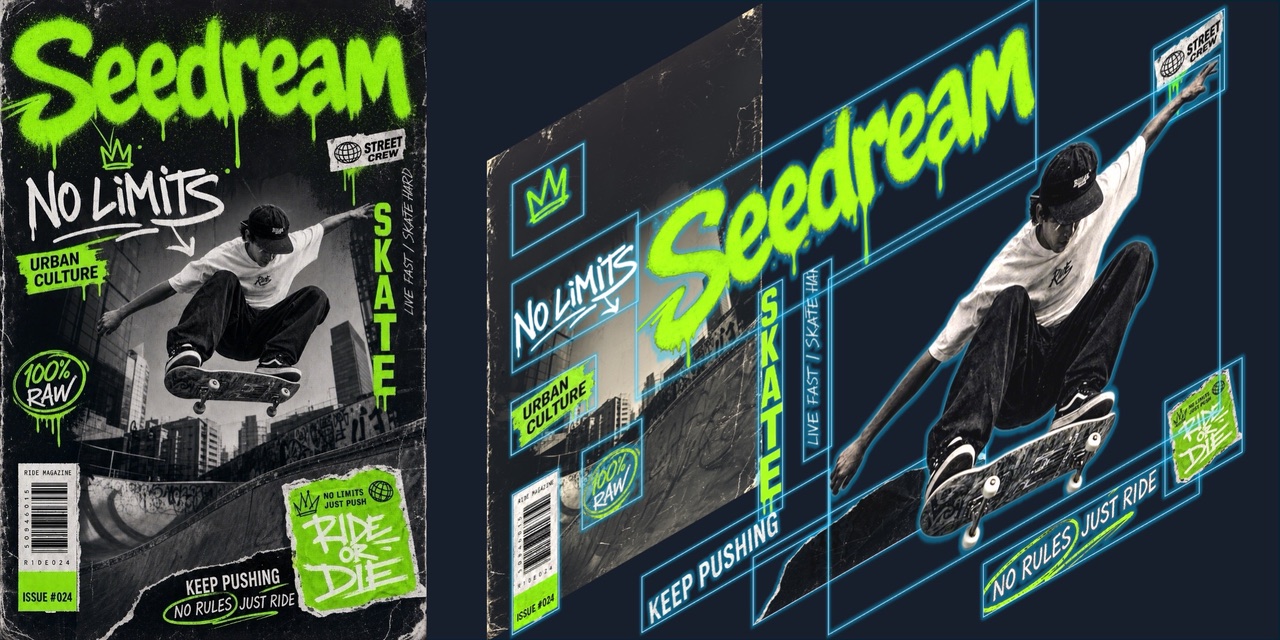
Multi-layer separation: split one image straight into editable layers多图层分离:一张图直接拆成可编辑图层
Exclusive capability独家能力The generated skateboard magazine cover (left) can be split apart on demand: the headline text, figure, stickers, and background each become independent layers (right) — like getting the source file instead of a flattened image. Changing the tagline doesn't require regenerating the whole image. The official demo video is above. 生成的滑板杂志封面(左)能按需求拆开:标题字、人物、贴纸、背景各自独立成层(右)——像拿到源文件而不是一张死图。改标语不用重生成整张图。官方演示视频在上方。
- After a normal generation, specify in the prompt to "separate the title / figure / background into independent layers" to try it; Playground doesn't have a dedicated layer UI yet, so results follow the official model's capability
- 正常生成后,在 prompt 里指定「将标题 / 人物 / 背景分离为独立图层」即可尝试;目前 Playground 没有专门的图层 UI,效果以官方能力为准
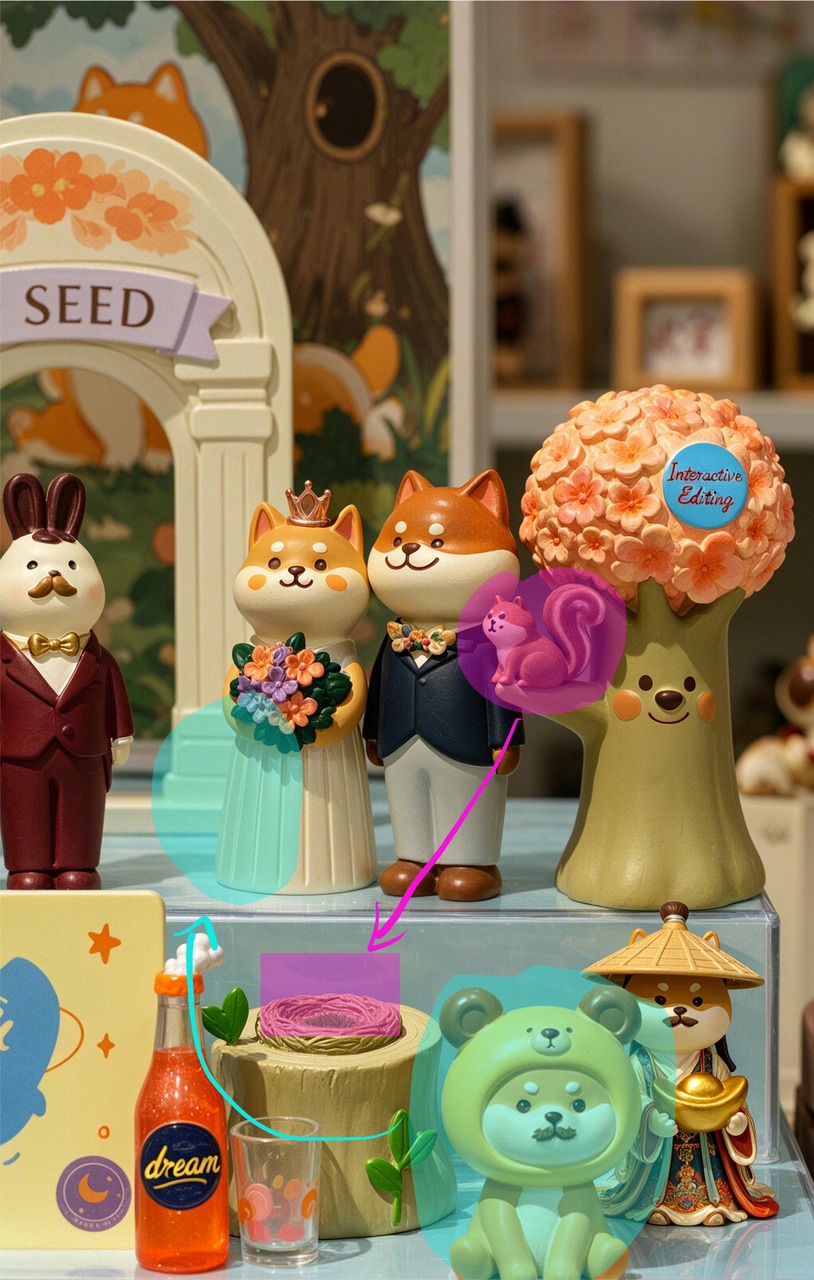
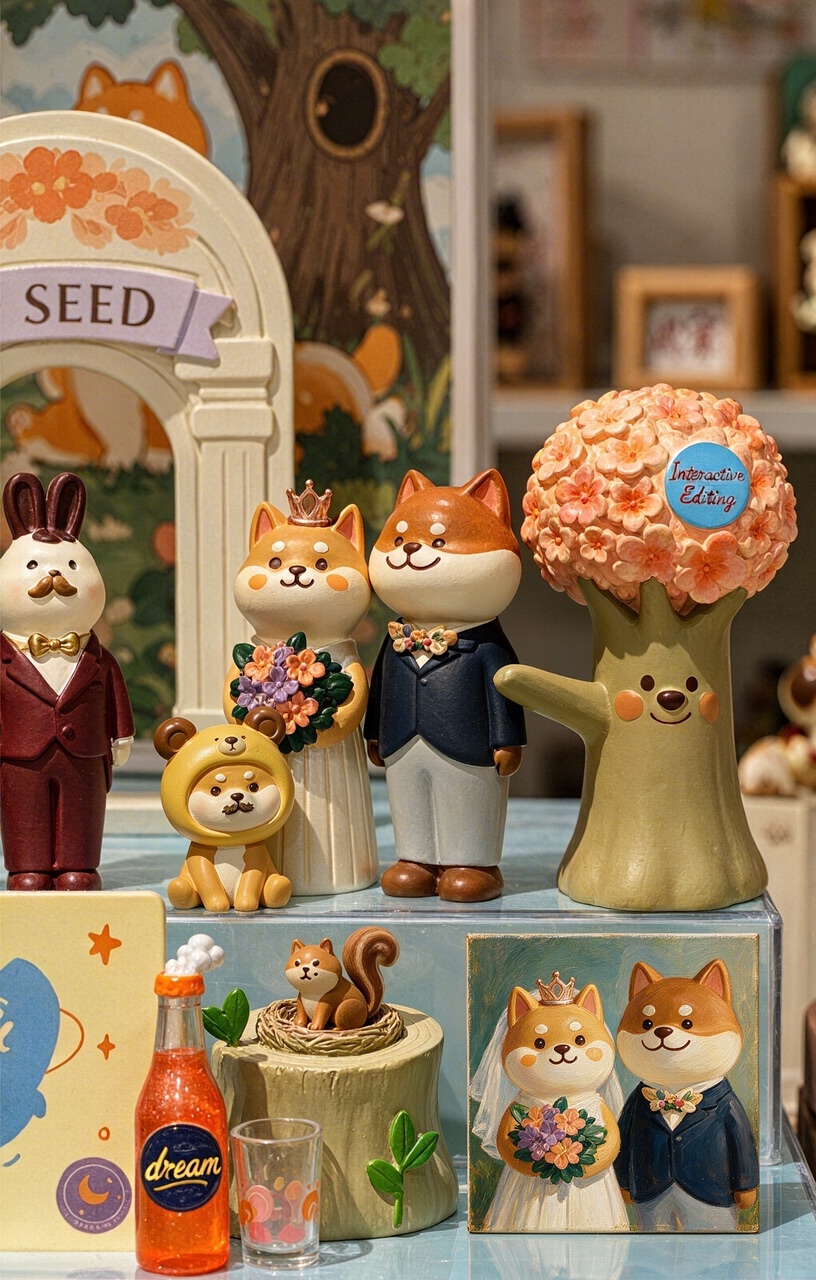
Circle-to-edit: draw a circle or an arrow on the image, and it understands圈选即改:在图上画个圈、拉个箭头,它就懂
Interactive editing交互式编辑An official example: circle a squirrel and draw an arrow dragging it to a tree stump, highlight a bride's dress hem and annotate a color change, box an empty area and write "add a painting" — the model executes every annotation in one pass, with the perspective, lighting, and style of each change automatically matching the original image. Zoom in on the right image to see the squirrel's nest on the stump and the newly added wedding portrait. 官方案例:在原图上圈住松鼠画箭头拖到树桩、高亮新娘裙摆标注换色、框选空白处写「加一幅画」——模型一次执行所有标注,每处修改的透视、光影、风格都自动贴合原图。放大看右图树桩上的松鼠窝和新增的婚礼画像。
- On any generated image, video frame, or uploaded visual, click Annotate
- Draw a box, ellipse, arrow, freehand mark or text, add an optional modification note, then choose Use annotated copy; Playground uploads the screenshot and inserts it into your prompt automatically
- 在任何生成图片、影片画面或已上传视觉素材点击 Annotate
- 画框、椭圆、箭头、自由笔或文字,填写可选的修改说明,再点 Use annotated copy;Playground 会上传截图并自动插入 prompt
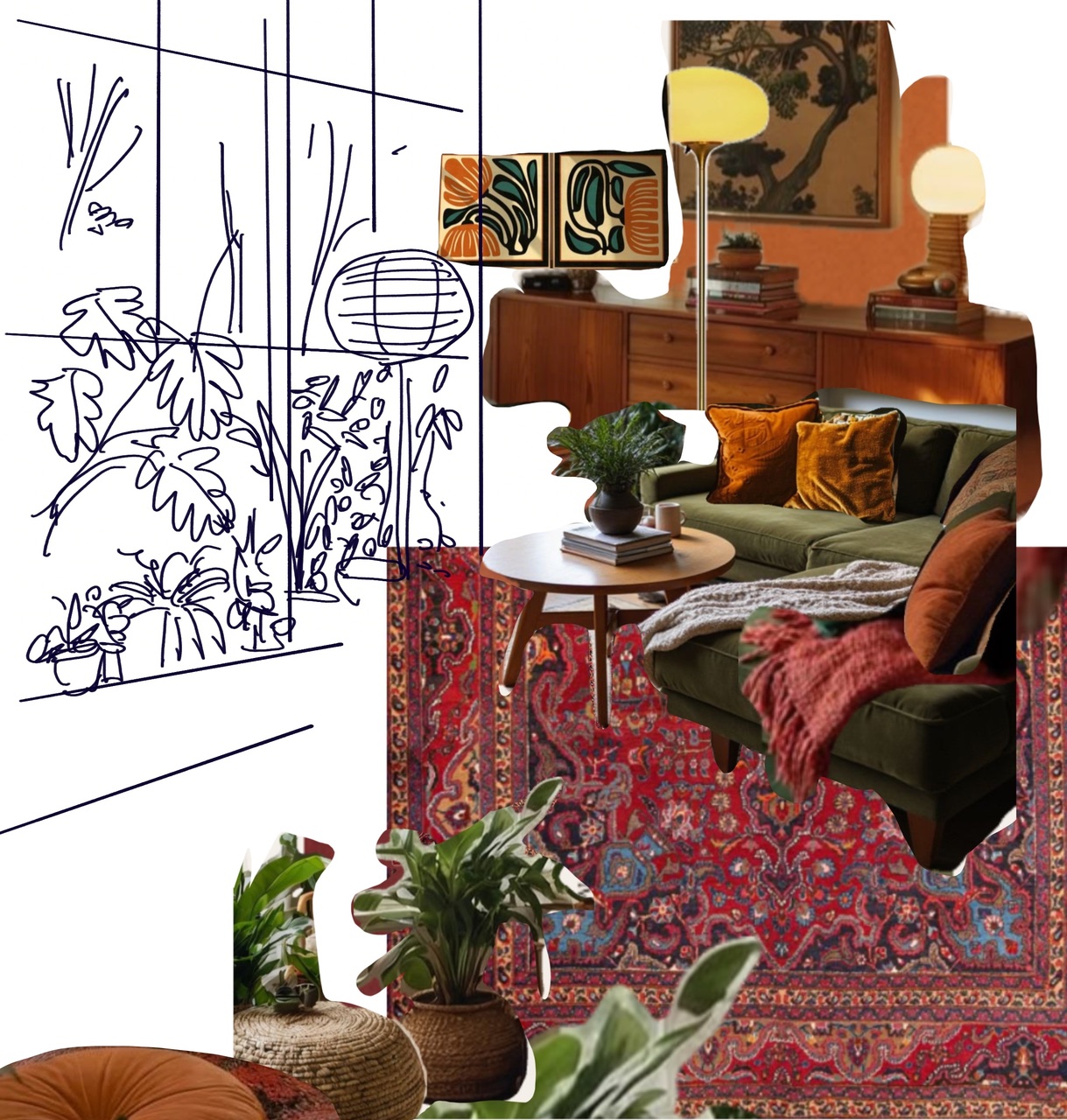
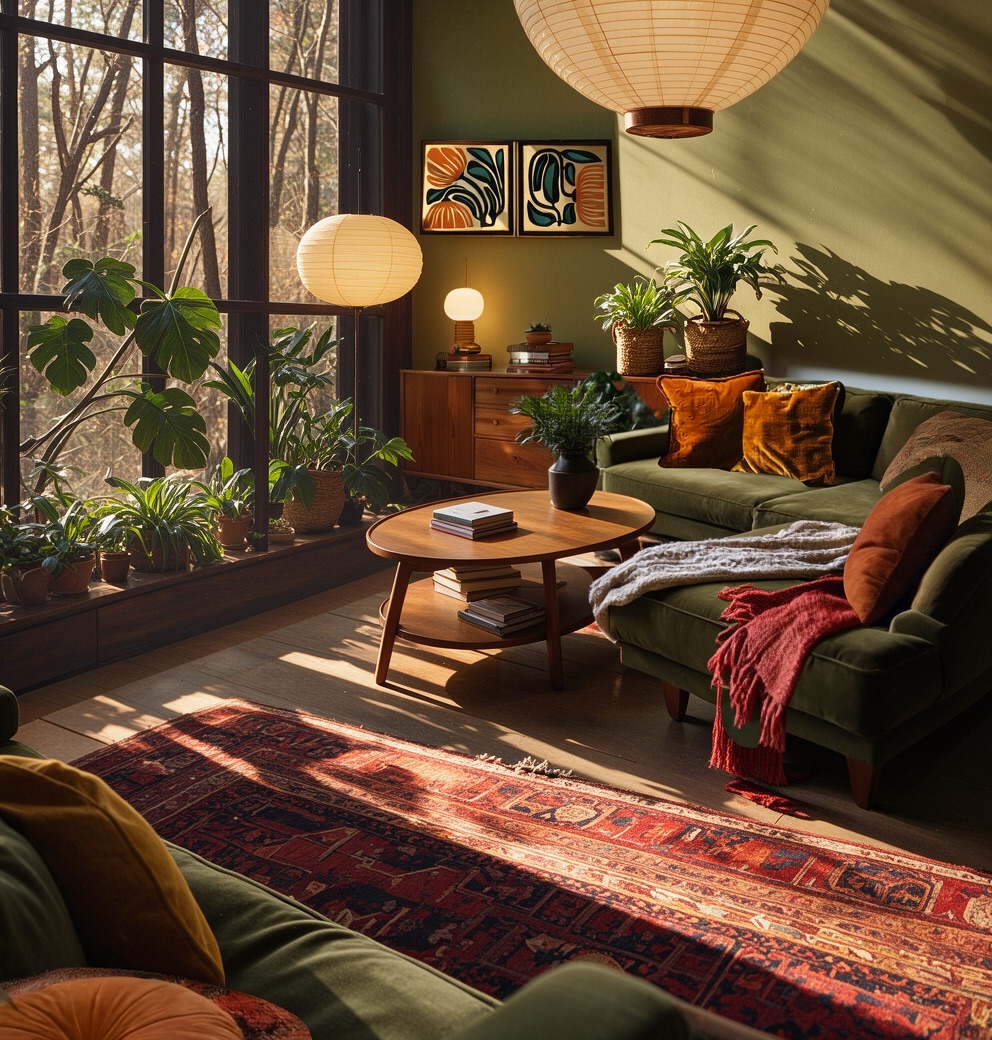
Moodboard → finished image: fusing 10 references at onceMoodboard → 成品图:10 张参考一次融合
Multi-image fusion多图融合Drop in the sketch layout plus photos of the sofa, rug, wall art, and lighting fixtures, and Seedream understands exactly where each item belongs, producing a photorealistic image with completely unified lighting, color, and perspective — the sofa is still that sofa, the rug is still that rug. A concept image for a pitch goes from half a day to one minute. 把线稿构图、沙发、地毯、挂画、灯具的素材照全部丢进去,Seedream 读懂每件东西该在哪,输出一张光线、色调、透视完全统一的实景图——沙发还是那张沙发,地毯还是那块地毯。提案概念图从半天缩到一分钟。
- Upload up to 10 reference images (Seedream 5.0 Pro) or 14 (Lite)
- Describe the layout relationships and overall mood in the prompt
- 上传最多 10 张参考图(Seedream 5.0 Pro)或 14 张(Lite)
- prompt 说明布局关系与整体氛围
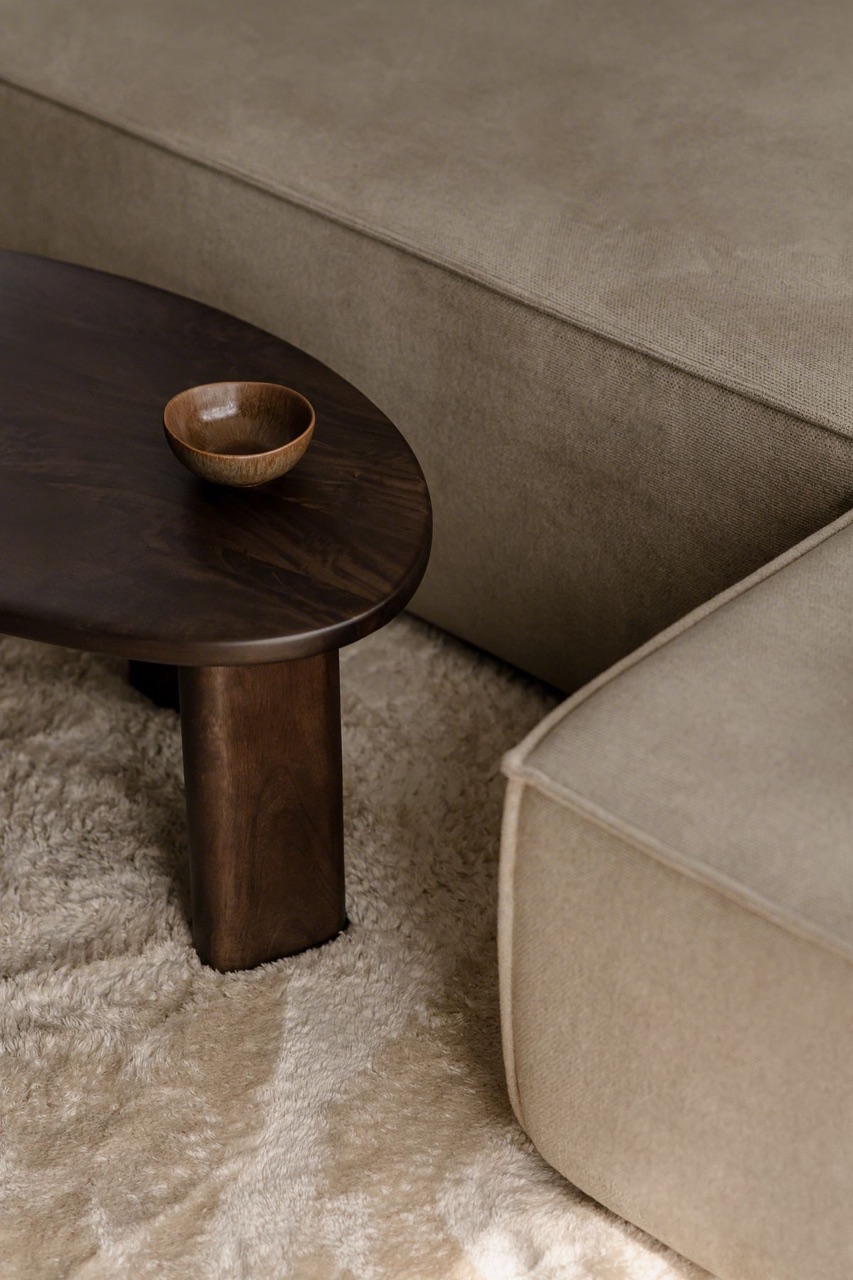
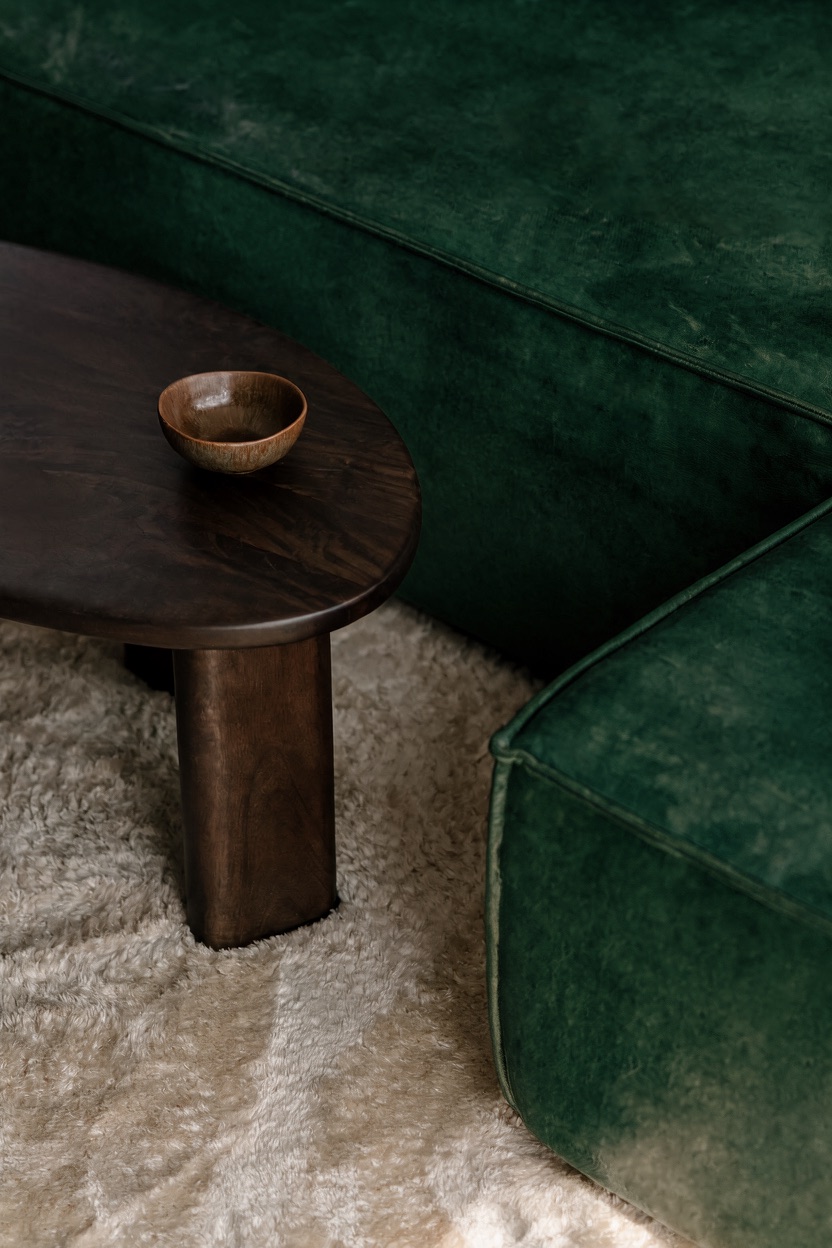
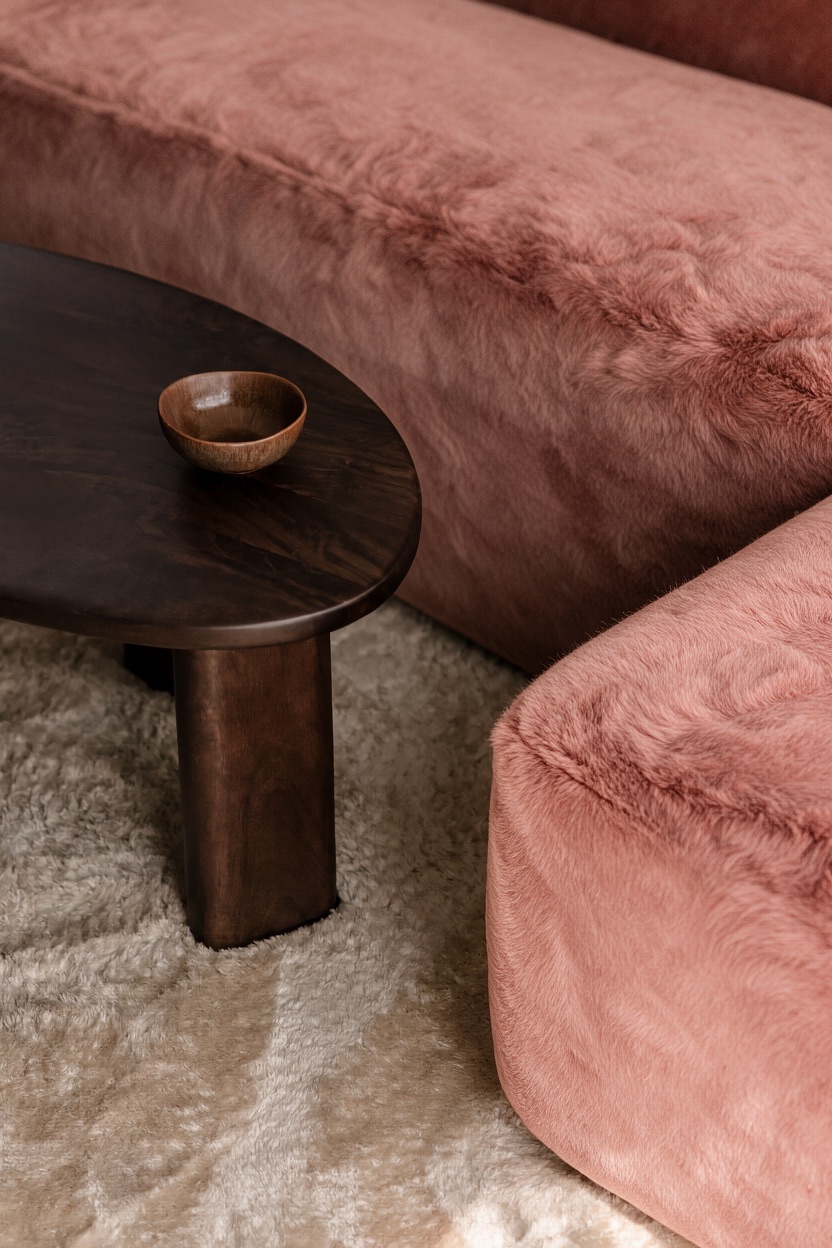
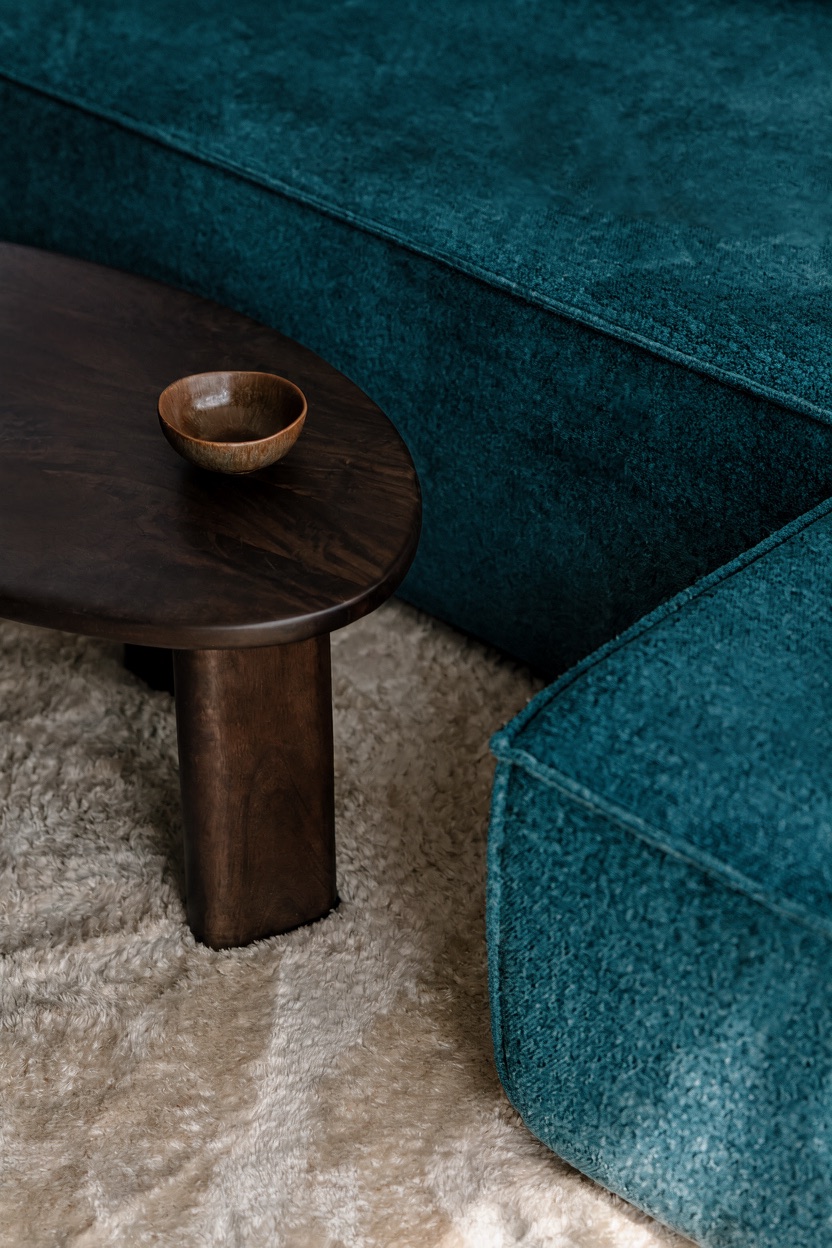
Precise recoloring by HEX: give it a color value, and only that one item changesHEX 色号精准换色:给个色值,只动那一件
Precision editing精准编辑Give a HEX color code directly in the prompt, and the specified object changes to exactly that color — the fabric texture, lighting, and surrounding environment all stay untouched. Brand-color mockups, multi-color e-commerce SKU shots — one sentence, one image. 直接在 prompt 里给 HEX 色号,指定对象就换成精确的那个颜色——绒布纹理、光影、周围环境全部不动。品牌色打样、电商 SKU 多色图,一句话一张。
- Open the floating Color Tool at the lower-right of Playground; use the visual picker or Eyedropper, then copy HEX, RGB, HSL, HSV or approximate CMYK
- Upload the original and prompt: "Change the sofa to color #105666, keep everything else exactly the same"
- 打开 Playground 右下角的 Color Tool;用视觉调色板或 Eyedropper 取色,再复制 HEX、RGB、HSL、HSV 或近似 CMYK
- 上传原图并写:「把沙发换成 #105666 颜色,其余保持完全不变」
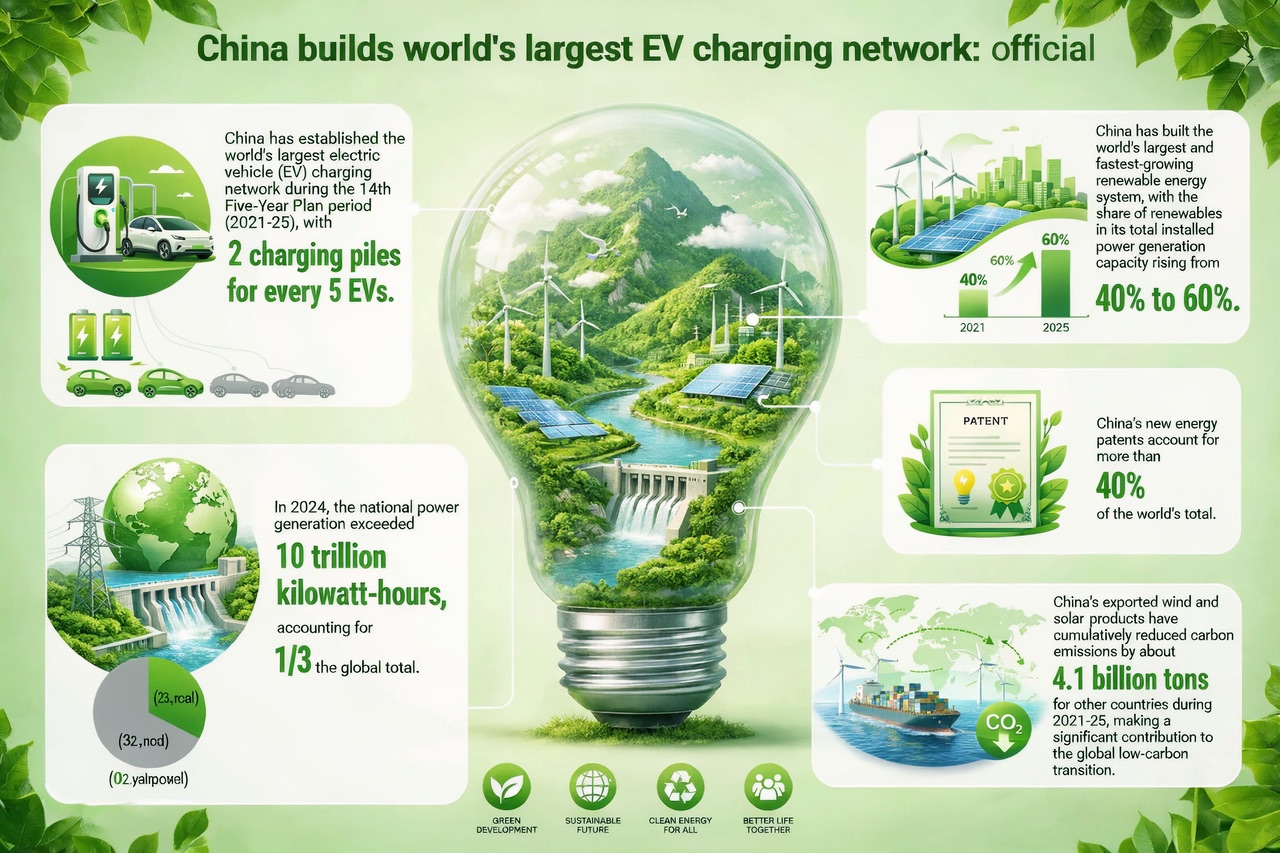
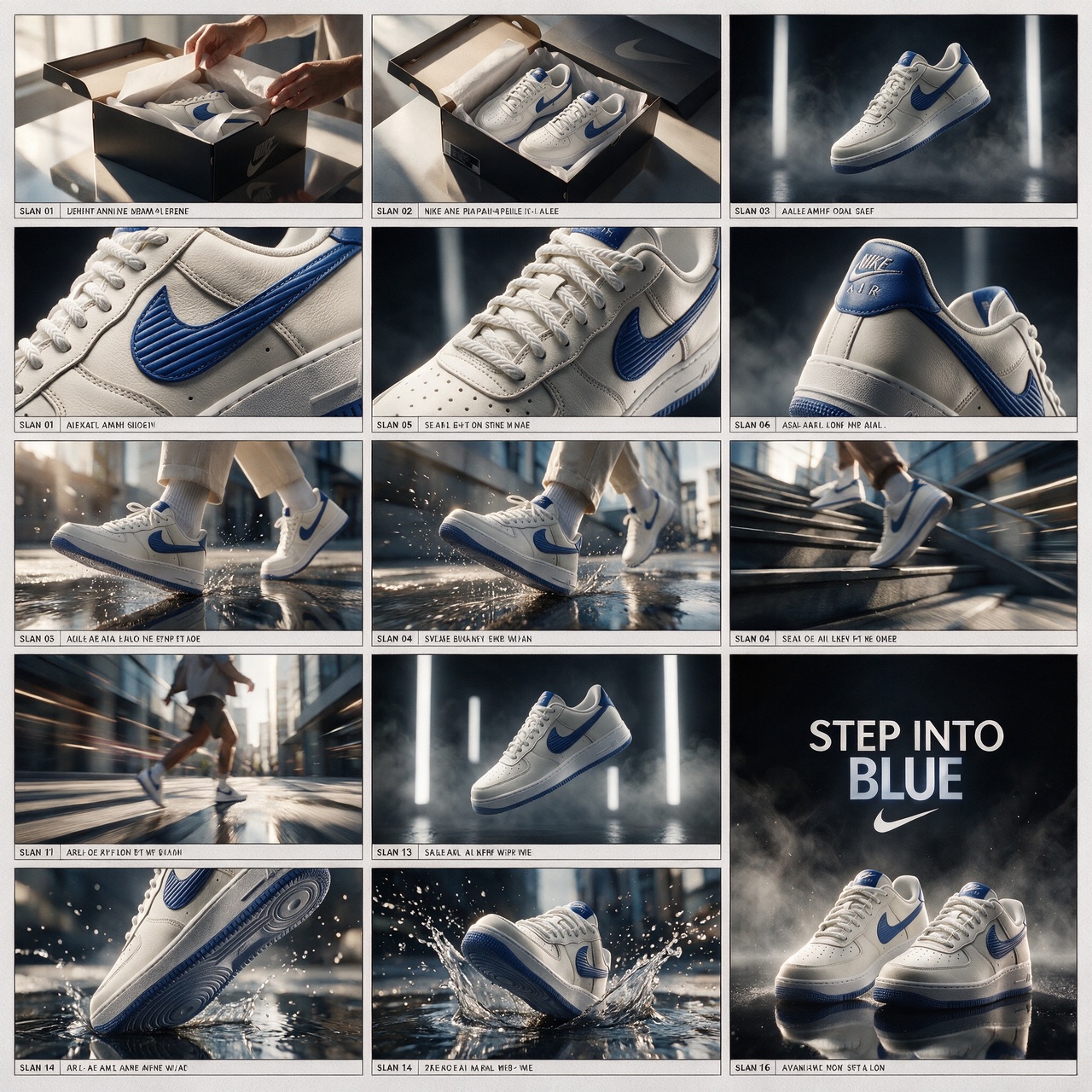
Infographics & storyboards: structured layout in a single pass信息图 & 分镜:结构化排版一次成型
Text-to-image文字生图Left: a complete infographic — data visualization, flowcharts, mixed text and image — generated in one pass, with small text still legible. Right: a 16-panel ad storyboard straight from one prompt — unboxing, close-up, street shot, water splash, closing slogan, the full shot vocabulary — usable directly as a shooting script or fed into Seedance as a reference. 左:数据可视化、流程图、图文混排的完整信息图一次生成,小字依然清晰。右:产品广告的 16 格分镜 storyboard 一句话直出——开箱、特写、街拍、水花、收尾 slogan 全套镜头语言,直接当拍摄脚本或喂给 Seedance 当参考。
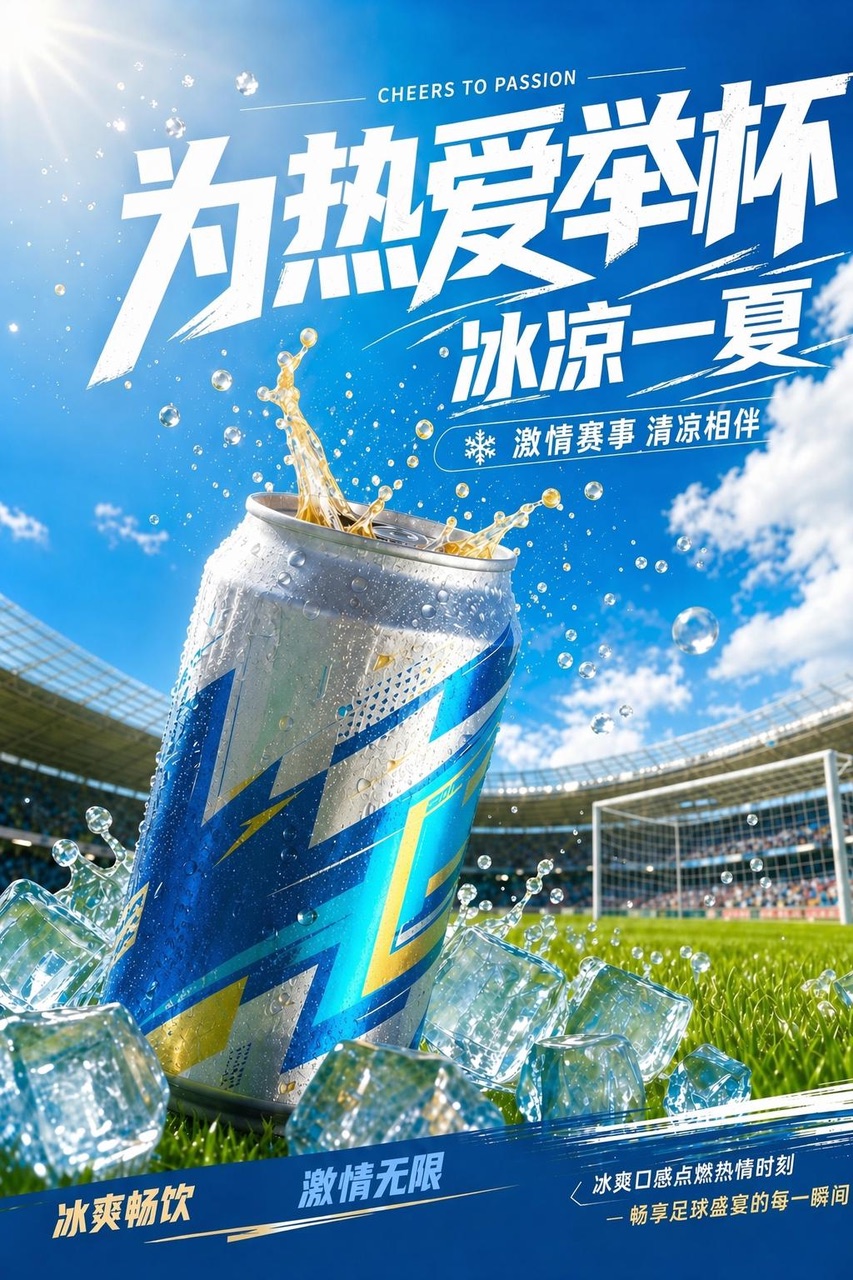


The same poster, natively typeset in 16 languages同一张海报,16 种语言原生排版
Multilingual多语言Same layout, but the brush-lettering headline is redrawn to fit each language — the Chinese calligraphy feel and Arabic script connections are both correct. Beyond Chinese and English, 14 more languages are supported (Malay, Thai, Japanese, Korean, Spanish...). For us: one key visual directly produces localized versions for the entire Southeast Asian market. 同一个版式,标题笔刷字效跟着语言重新绘制——中文书法感、阿拉伯文连笔都对。中英之外新增 14 种语言(马来文、泰文、日韩、西语…)。对我们:一套 KV 直接出全东南亚市场的本地化版本。
Nano Banana 2
Latest · just added to the tool最新版 · 刚接入工具Google's newest image model (Gemini 3.1 Flash Image). It "thinks before it draws," verifying rendered text character by character, and can lock character consistency across up to 5 people at once — the go-to choice for making a series of images with the same character. Google 最新图片模型(Gemini 3.1 Flash Image)。生成前会先「想清楚再画」,文字渲染逐字校验,角色一致性最多同时锁 5 个人——是做「同一角色系列图」的首选。
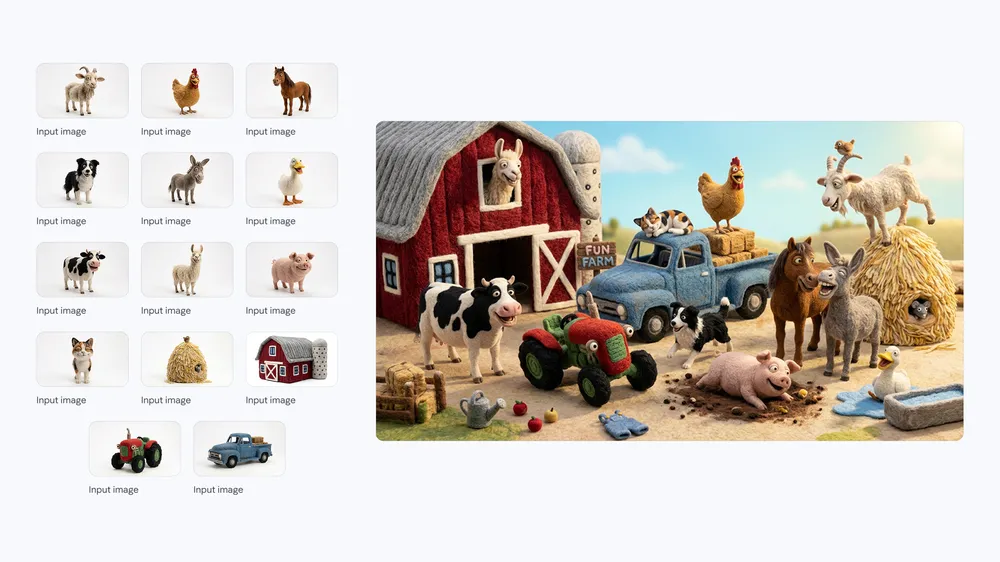
Fourteen inputs → one coherent farm scene14 个输入素材 → 一张完整农场场景
14-reference edit14 图参考编辑Google's official example shows all 14 supplied characters and objects across the top, then the generated farm scene below. The hard part is not merely placing many items: each identity remains recognizable while scale, pose, lighting and interaction are rebuilt into one playful composition. Playground now accepts up to 14 references for this model and routes multi-reference requests through its editing mode. Google 官方案例把 14 个输入角色与物件全部列在上方,下面是合成后的农场场景。难点不只是把很多东西塞进去,而是每个身份仍可辨认,同时把比例、姿势、光线与互动重新组织成统一画面。Playground 现在为这个模型开放最多 14 张参考,并让多参考请求走编辑模式。
- Choose Nano Banana 2 and upload 2–14 reference images in the Composer
- Click Add for every identity or object that must appear, then describe the shared scene and the consistency constraint
- 选择 Nano Banana 2,在 Composer 上传 2–14 张参考图
- 对必须出现的每个角色/物件点击 Add,再描述共同场景与一致性约束
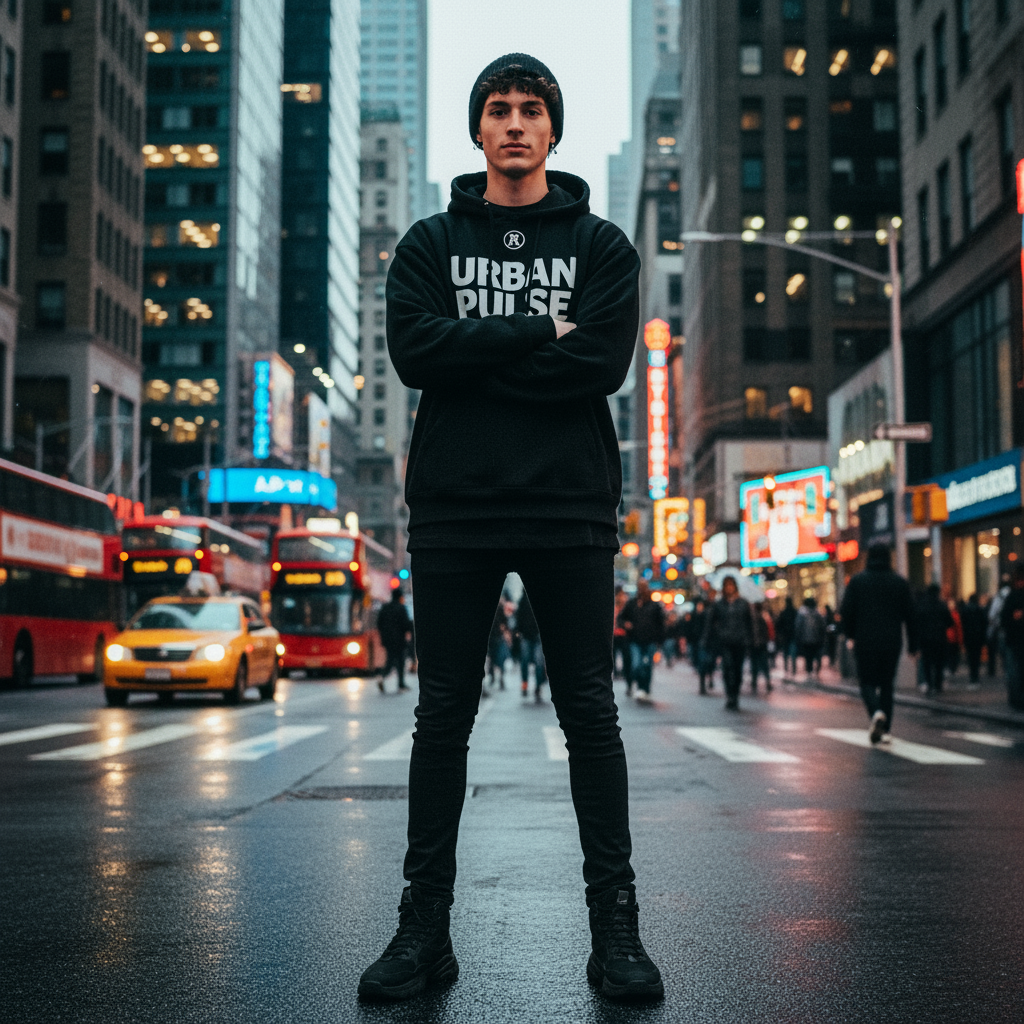
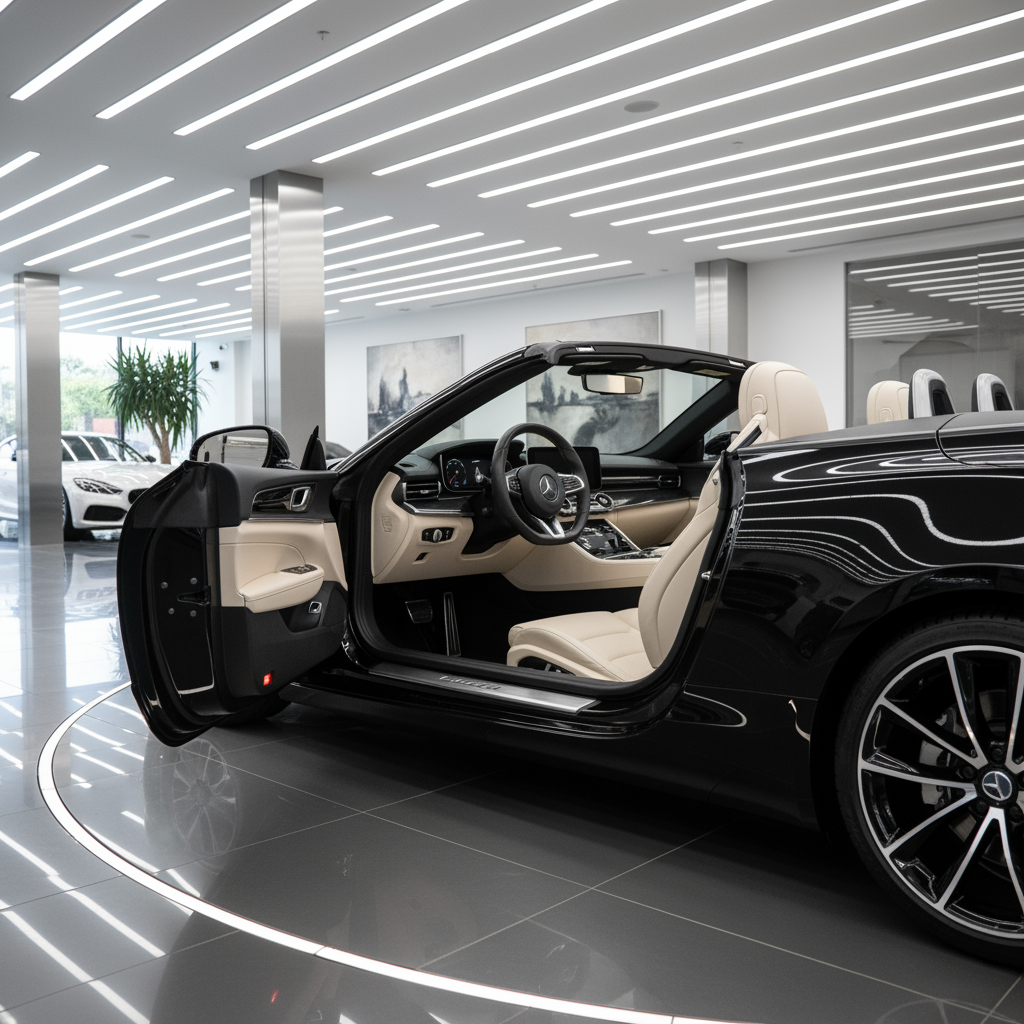
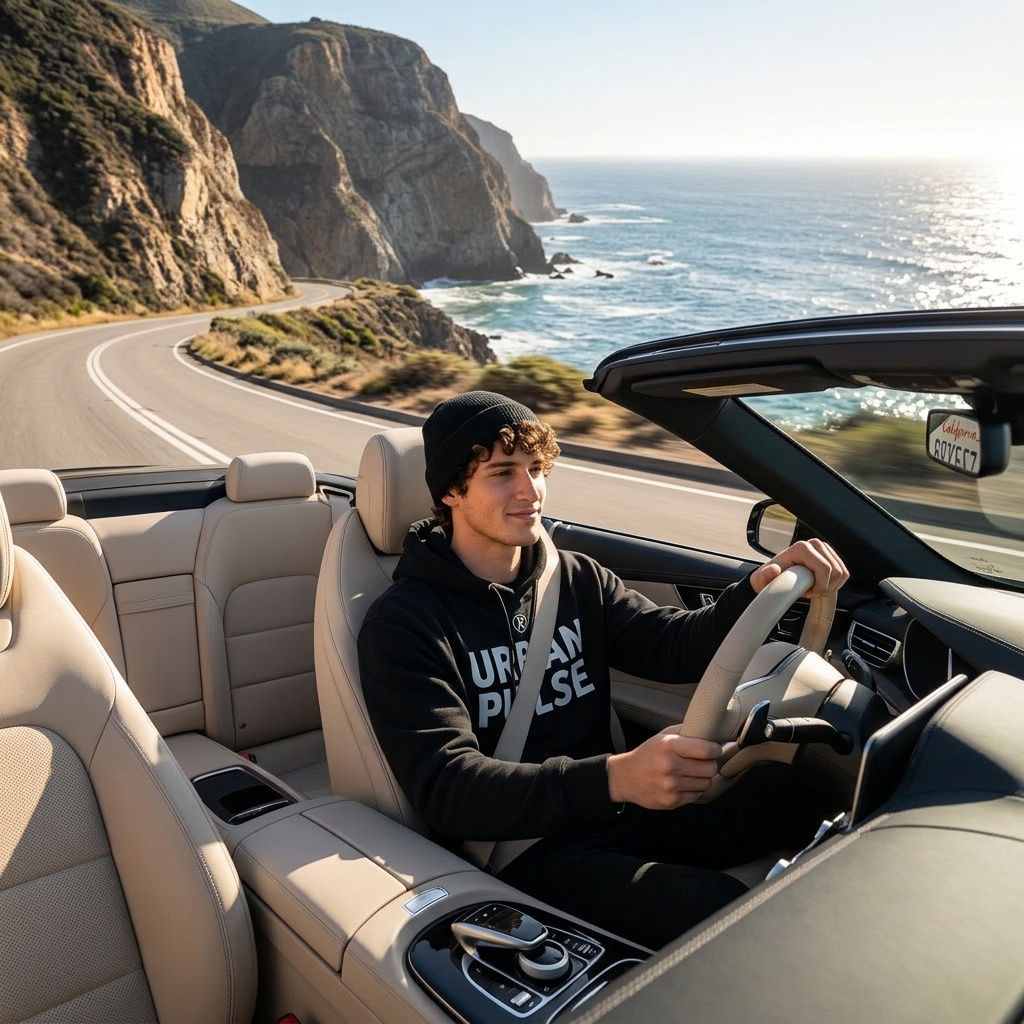
Multi-reference compositing: seamlessly merge two sources into one image多参考合成:把两个来源无缝放进一张图
Reference-image editing参考图编辑An official edit example: two independent reference images → one composited image, with both subjects' features and materials fully preserved. This is how it handles product + scene, person + outfit composites. 官方 edit 示例:两张独立参考图 → 一张合成图,两个主体的特征、材质都被完整保留。这就是它做产品 + 场景、人物 + 服装组合图的方式。
- Upload 1 product or person photo as a reference
- Use the same reference to generate 4 different scenes in a row, and compare whether the appearance stays perfectly consistent
- 上传 1 张产品/人物照做参考
- 用同一张参考连续生成 4 个不同场景,对比外观是否完全一致
ChatGPT Image 2
OpenAI's newest image model (GPT Image 2). The most reliable of all the models for text layout — small text on signs, menus, UIs, and infographics almost never comes out wrong, and it's stable with Chinese, Japanese, and Korean too. It's the most expensive per image, so use it when the text absolutely has to be right. OpenAI 最新图片模型(GPT Image 2)。所有模型里文字排版最可靠的一个——招牌、菜单、UI、信息图上的小字几乎不出错,中日韩文也稳。单张最贵,用在「文字必须对」的场合。
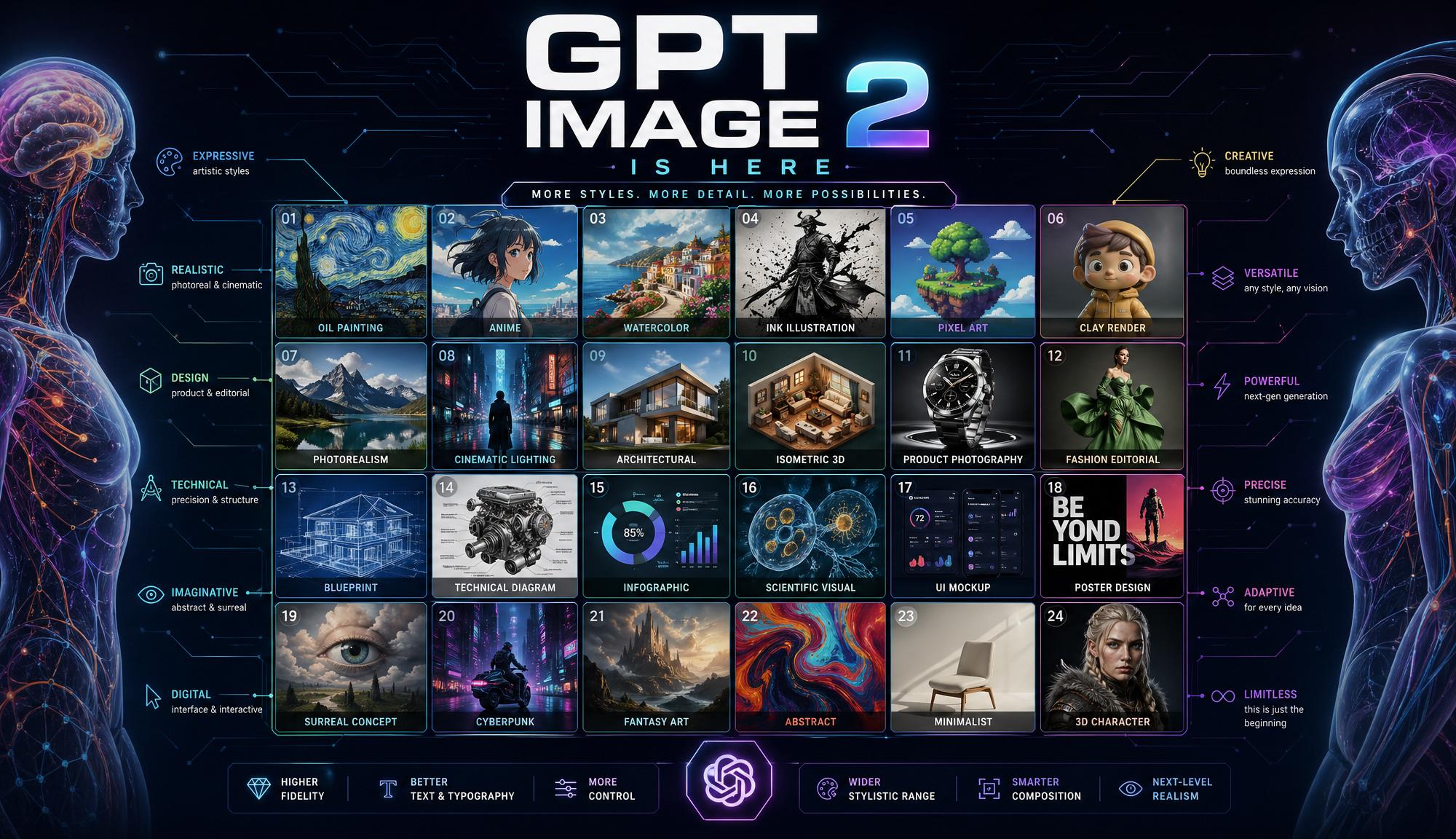
Typography benchmark: dense small text still holds upTypography 基准:密集小字也不崩
Text-to-image文字生图A verified third-party headline example showing extremely fine-grained imagery and typography. Zoom in on every line of text: this is exactly where other models most often slip up, and where GPT Image 2 is especially reliable. 经过验证的第三方 headline 示例,展示极度精细的图像与排版。放大看图里的每一行字:这是其他模型最容易露馅、GPT Image 2 特别稳定的地方。
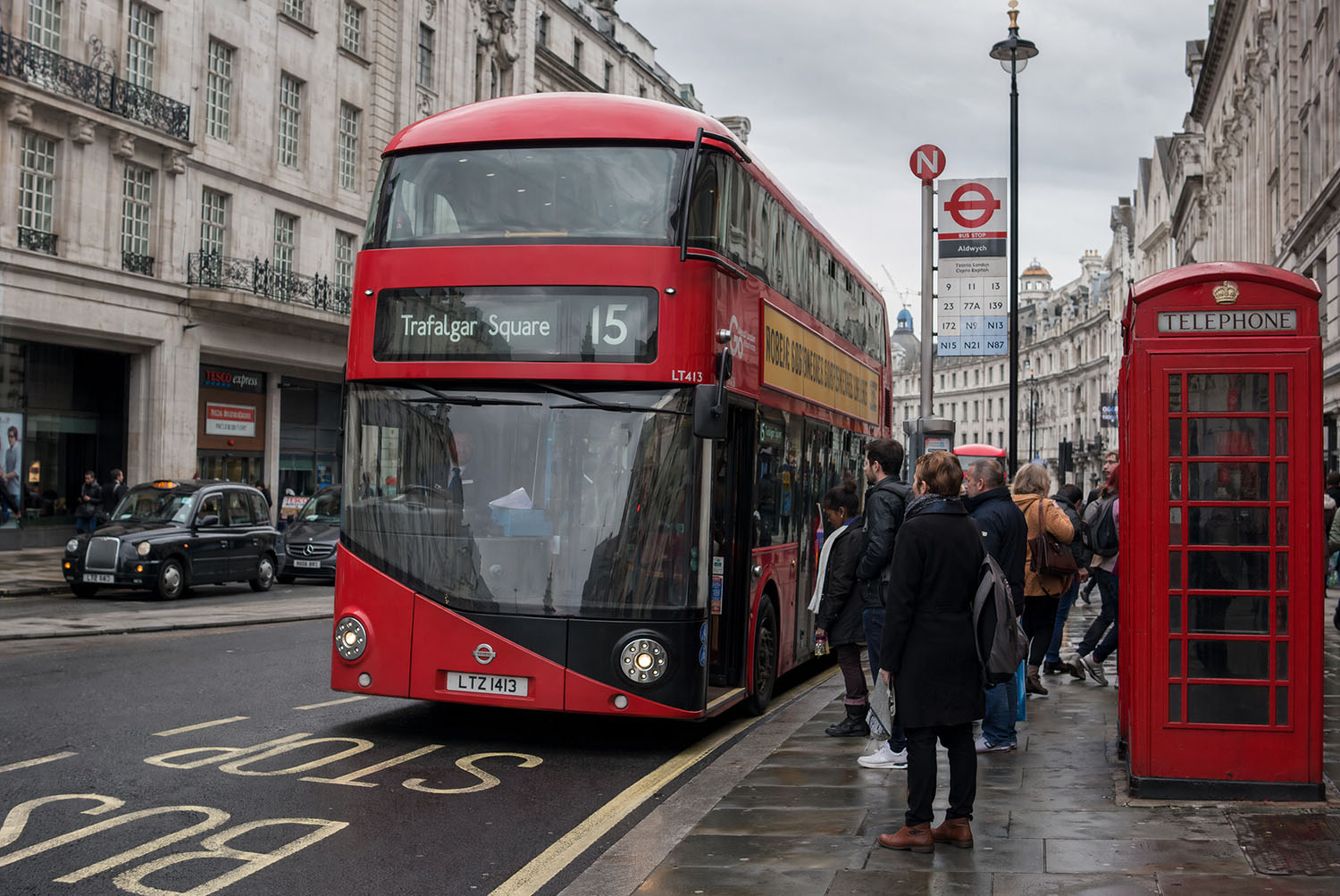
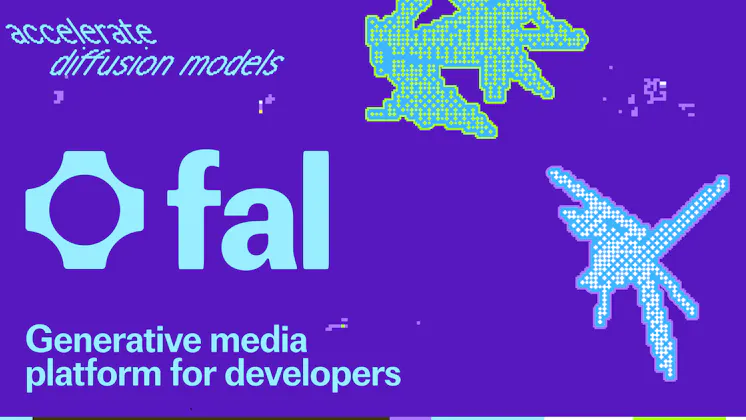
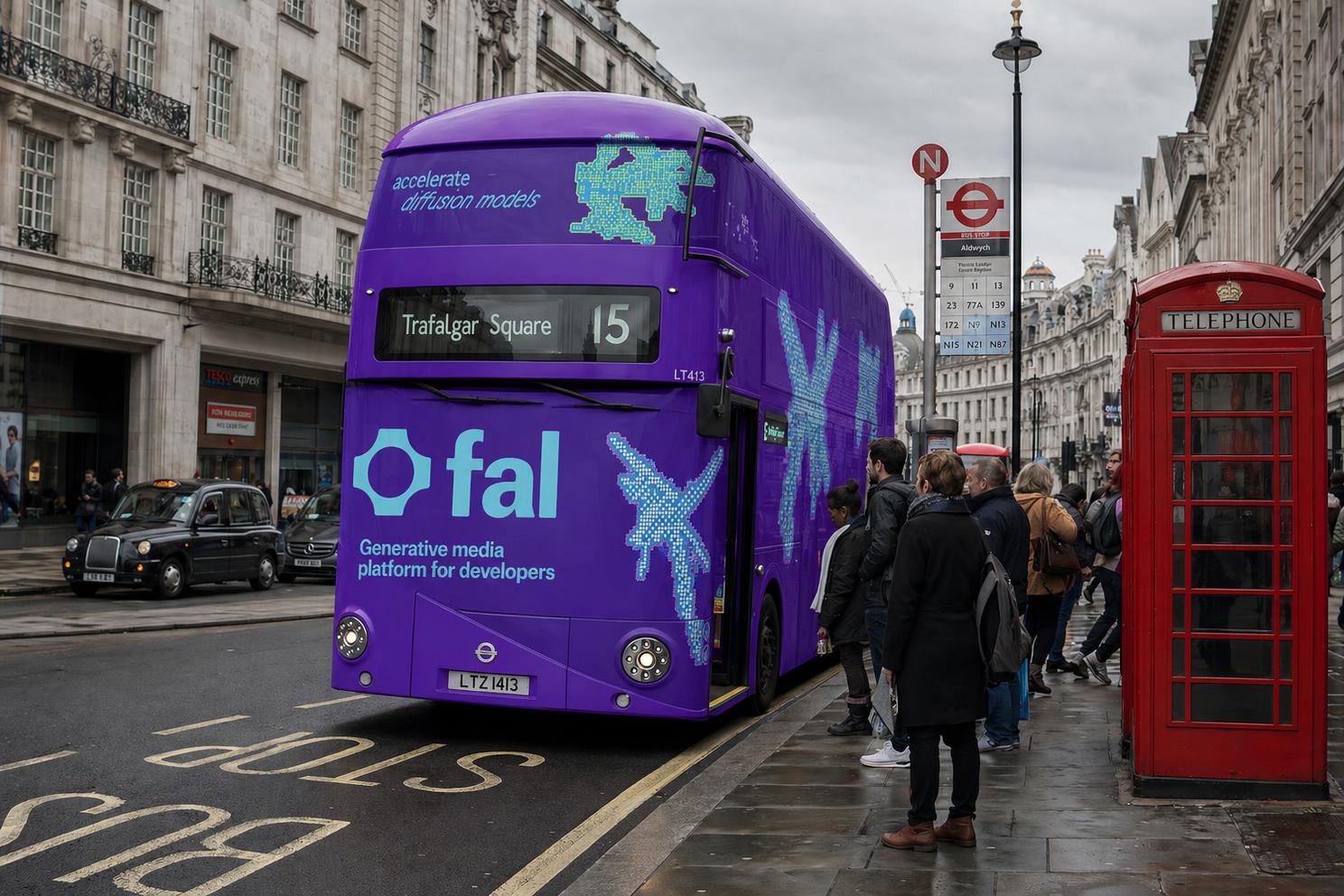
Brand it up: apply a key visual to any surface品牌上身:把 KV 贴到任何载体上
Reference-image editing参考图编辑An official example: a bare-vehicle photo + a brand design file → one finished photo of a fully wrapped bus ad. The graphics correctly warp along the curve of the vehicle body, and the text stays crisp. For client pitches: mockups of a logo/key visual applied directly to a vehicle, storefront, packaging, or uniform — one image per minute. 官方案例:素车照 + 品牌设计稿 → 一张涂装完成的巴士广告实拍。图形沿车身曲面正确变形、字没有糊。对客户提案:logo/KV 直接「上」到车身、店面、包装、制服的效果图,一分钟一张。
- Upload a real photo of the surface (vehicle/storefront/packaging) as reference 1, and the brand key visual as reference 2
- Describe how it should wrap in the prompt, and specify keeping the original image's lighting
- 参考图 1 传载体实拍(车/店面/包装盒),参考图 2 传品牌 KV
- prompt 说明贴合方式与保留原图的光线
Seed Audio 1.0
The only pure-audio model in the tool: one prompt produces a complete soundscape — dialogue, emotion, sound effects, and BGM — all at once. It can also clone a voice from 3 samples, or score ambient audio from a single image. No more booking a recording studio for ad voiceovers or podcast material. 工具里唯一的纯音频模型:一段 prompt 直接产出「对白 + 情绪 + 音效 + BGM」的完整声音场景,还能用 3 段样本克隆音色、或丢一张图让它配氛围音。广告配音和播客素材不用再开录音棚。
A 65-second radio drama: one prompt, one whole scene65 秒广播剧:一段 prompt,整场戏 Headphones recommended戴耳机听
Text-to-audio文字生音频An official example: a late-night convenience-store mystery radio drama — multi-character dialogue, footsteps, a door chime, and background sound are all generated in one pass, not stitched together from separate tracks. 65 seconds costs $0.16. Listen once and you'll understand what "cinematic audio generation" means. 官方示例:深夜便利店悬疑广播剧——多角色对白、脚步声、门铃、背景音全部一次生成,不是分轨拼的。65 秒成本 $0.16。听一遍就明白「电影级音频生成」是什么意思。
Voice cloning: build a "voice library" and mix multiple voices in one dialogue音色克隆:建一个「声音库」,一段对白里混用多个音色
Reference audio参考音频An official example: first upload two reference voices separately (Dex / Priya), then in the same prompt use @Audio1 / @Audio2 to name them and have the two voices have a conversation — the clip playing at the bottom is dialogue generated with these two cloned voices. This is exactly the same workflow as "upload reference audio → reference it with @" in Playground. Apply the same trick with Chinese/English/Malay copy, and your brand voice stays the same person across markets, with no need to re-hire a voice actor. 官方示例:先分别上传两段参考人声(Dex / Priya),然后在同一段 prompt 里用 @Audio1 / @Audio2 指名让两个音色对话——最下面播放的就是用这两个克隆音色生成的对白。这跟 Playground 里「上传参考音频 → 用 @ 引用」的操作方式完全一样。同一招换成中/英/马来文文案,品牌声音跨市场保持同一个人,不用重新请配音。
- In the Audio tab, upload 1–3 reference voice clips (each is automatically labeled @Audio1, @Audio2…)
- Prompt: "Have @Audio1's voice say "…," @Audio2 replies "…""
- Fine-tune pace/pitch/volume with the sliders as needed
- Audio tab 上传 1–3 段参考人声(每段会自动标成 @Audio1、@Audio2…)
- prompt:"用 @Audio1 的音色说 "……",@Audio2 回答 "……""
- 语速/音高/音量滑杆按需微调
Image-to-audio: give it a scene photo, and it scores the whole soundscape看图配音:给一张场景图,它配出整个声场
Reference image参考图片This capability is documented in the official API docs (1 reference image, mutually exclusive with voice cloning), but we haven't been able to find an official playable example, so we're not putting up a fake demo here — the result is unverified, and we'd suggest logging into the dashboard and trying it yourself. Once you get a result you're happy with, we'll add the real audio to this card. 这项能力在官方 API 文档里有写(1 张参考图,与音色克隆二选一),但我们没能找到官方发布的可播放案例,所以这里先不放假的示范——效果未经验证,建议登入后台自己试一次。等你测出满意的结果,我们就把真实音频补进这张卡片。
Speech Cleanup (Denoise)语音降噪
NEW新Clean background noise out of any recording — no prompt needed, just upload and go. 把嘈杂环境录音一键清理干净——无需 prompt,上传即可。
One-click cleanup for noisy speech recordings吵杂人声录音一键清理
Audio utility声音工具This is a newly added model in Playground (DeepFilterNet3), separate from Seed Audio — upload a recording made in a noisy environment (say, an interview recorded in a coffee shop), and with no prompt required, it outputs a clean voice track with the background noise removed. It's already selectable in the tool; we haven't done a real before/after comparison yet, so once you log into the dashboard and run it once, we'll add a demo clip here. 这是刚接入 Playground 的新模型(DeepFilterNet3),跟 Seed Audio 是不同的模型——上传一段吵杂环境录的音频(比如咖啡店里录的采访),不用写 prompt,直接输出去掉背景噪音后的干净人声。工具里已经能选到,我们还没做真实的降噪前后对比,你登入后台生成一次之后我们把示范音频补上。
- In the Audio tab, choose the "Speech Cleanup (Denoise)" model
- Upload the noisy recording and just click Generate — no prompt required
- Audio tab 模型选「Speech Cleanup (Denoise)」
- 上传吵杂录音,直接点 Generate——不需要填 prompt